Google Analytics has become an indispensable tool for businesses worldwide. With over 37.9 million websites using the platform and 55.49% of all websites relying on it to monitor performance, understanding how to effectively leverage Google Analytics for businesses is no longer optional—it’s essential for growth. Small businesses account for 73% of Google Analytics users, proving that data-driven decision-making isn’t just for large enterprises anymore.
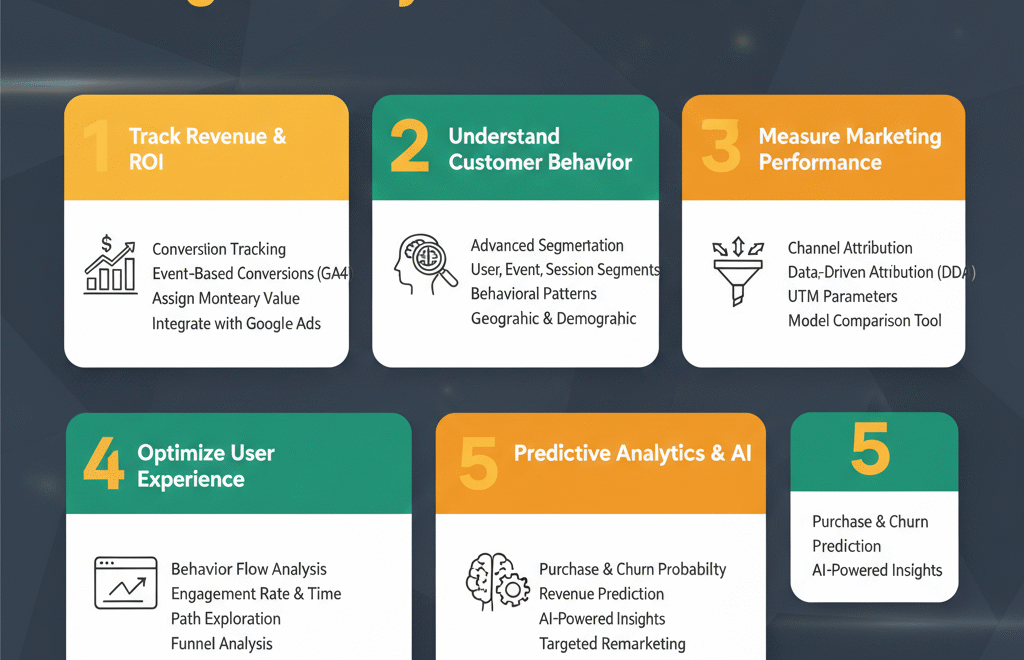
1. Track Revenue and ROI Through Conversion Tracking in Google Analytics for Businesses
Conversion tracking stands as the foundation of measuring business success online. According to recent data, the average ROI improvement after full GA4 implementation stands at 17.6%, demonstrating the tangible financial impact of proper analytics usage.
Setting up conversion tracking allows you to identify which marketing efforts actually generate revenue. In GA4, conversions are tracked through key events that represent important actions like purchases, sign-ups, or quote requests. Unlike Universal Analytics, which limited you to 20 goals, GA4 offers unlimited event tracking with complex sequences.
To maximize conversion tracking effectiveness, assign monetary values to each conversion type. For e-commerce businesses, platforms like Shopify automatically send purchase data, including value, currency, and items, to GA4. For lead generation businesses, you can manually add estimated values based on historical close rates. For example, if ten leads typically produce one sale worth $1,000, assigning $100 per lead gives directional insight into campaign performance.
The real power emerges when you combine conversion tracking with cost data from advertising platforms. By importing spend data from Google Ads, Facebook Ads, and other channels, you can calculate true ROAS (Return on Ad Spend) and identify which campaigns deliver profitable returns. Research shows that proper conversion tracking helps businesses recover an average of 34% more conversions compared to pixel-only setups.
Integration with Google Ads enables automated bidding strategies like “Maximize Conversions” and “Target ROAS,” which use your conversion data to optimize ad delivery. This creates a feedback loop where better data leads to better targeting, which generates better results, which provides better data for future optimization.
2. Understand Customer Behavior with Advanced Segmentation
Customer segmentation transforms raw analytics data into actionable business intelligence. By dividing your audience into meaningful groups, you can identify patterns that drive 80% of your business outcomes from just 20% of your traffic sources.
GA4 offers three powerful segmentation types. User segments filter by criteria like shopping cart additions or previous purchases. Event segments isolate specific triggered actions across different date ranges or operating systems. Session segments analyze individual touchpoints in the customer journey, such as sessions from particular marketing campaigns.
The business value of segmentation appears when you discover hidden insights. You might find that young professional women aged 25-34 in major metropolitan areas generate 80% of your sales despite representing only 15% of traffic. This discovery allows you to tailor messaging and concentrate ad spend on your highest-value audience segments.
Behavioral segmentation reveals how different customer groups interact with your site. High-value customers might browse 5-7 pages per session while low-intent visitors leave after viewing just one page. Understanding these patterns helps optimize the user experience for segments most likely to convert.
Geographic and demographic segmentation uncovers regional opportunities. If European visitors represent only 3% of traffic but show high engagement rates, expanding content targeting that region could unlock growth. Conversely, if paid search users account for just 5% of traffic but demonstrate high conversion rates, increasing ad investment becomes a data-backed decision rather than a guess.
For e-commerce businesses, segmentation by purchase frequency identifies your most loyal customers. Creating remarketing audiences for these segments enables personalized campaigns that increase lifetime value. Research indicates that audience segmentation increases conversion rates by allowing more relevant messaging that resonates with specific customer needs.
3. Measure Marketing Campaign Performance and Channel Attribution
Understanding which marketing channels drive business results separates successful companies from those wasting budget on ineffective tactics. GA4’s attribution capabilities have evolved significantly, with cross-channel data-driven attribution now available to all users rather than just enterprise accounts.
Attribution models determine how conversion credit is distributed across multiple touchpoints in the customer journey. A user might discover your business through a YouTube ad, return via email, and finally convert through organic search. Which channel deserves credit? The attribution model you choose fundamentally shapes how you evaluate performance and allocate budget.
GA4 uses Data-Driven Attribution as its default model for most conversion reporting. Unlike rule-based models that follow fixed formulas, DDA employs machine learning algorithms that analyze historical data from both converting and non-converting users. The model assesses how the presence and timing of specific marketing touchpoints impact conversion probability, assigning credit based on each interaction’s actual influence rather than arbitrary rules.
For businesses running Google Ads, 86% of Fortune 500 companies utilize Google Analytics to measure performance. The platform’s integration with Google Ads has surged by 61% since early 2024, enabling marketers to import conversions directly for campaign optimization. This tight integration means your GA4 conversion data automatically informs Google Ads bidding strategies, creating a unified optimization system.
Cross-channel performance measurement requires the proper implementation of UTM parameters on all campaign links. These customizable tags appended to URLs enable precise tracking of traffic sources in GA4. Without proper UTM structure, businesses risk poor attribution, wasted ad spend, and misleading performance reports. The utm_source parameter identifies where traffic originates (like “facebook” or “newsletter”), while utm_medium categorizes the marketing medium (like “social” or “email”), and utm_campaign specifies the specific promotional effort.
Attribution analysis reveals how channels support each other throughout the conversion funnel. Marketing consultant insights show that campaigns rarely convert on the first touch. A customer journey analysis might show that social media generates awareness, email nurtures consideration, and branded search captures final conversions. Without proper attribution modeling, you might incorrectly defund social or email because last-click models give them zero credit.
The Model Comparison tool in GA4 allows side-by-side analysis of how different attribution approaches distribute credit. This helps identify whether earlier touchpoints like initial organic visits are undervalued by Last Click attribution. According to marketing analytics research, understanding multi-touch attribution helps businesses optimize their marketing mix and increase overall efficiency by 15-25%.
4. Optimize User Experience with Behavior Flow Analysis
User behavior tracking reveals exactly how visitors interact with your website, exposing friction points that prevent conversions and highlighting content that drives engagement. GA4’s event-based model captures granular interactions that provide deep insights into the customer experience.
The Engagement Rate metric in GA4 measures meaningful interaction beyond simple page views. A session counts as engaged if it lasts longer than 10 seconds, involves at least one conversion event, or includes two or more page views. This sophisticated metric reveals whether content truly resonates with visitors and where experience improvements can boost performance.
Average Engagement Time tells you how long users actively interact with content. For businesses, this metric serves as a proxy for content quality and site usability. Low engagement times might signal slow loading speeds, technical errors, or confusing navigation. High engagement on specific pages identifies what captivates your audience, providing templates for future content creation.
Path exploration in GA4 visualizes the sequence of user actions, revealing common navigation patterns and unexpected behavior. You might discover that visitors landing on blog posts frequently navigate to pricing pages, suggesting that content marketing effectively nurtures purchase intent. Alternatively, high drop-off rates between product pages and checkout indicate friction in the buying process that requires optimization.
Funnel analysis tracks users through defined conversion paths, identifying exactly where potential customers abandon their journey. For e-commerce sites, you can measure completion rates from product view to add-to-cart to checkout initiation to purchase completion. Each drop-off point represents a quantifiable revenue opportunity. If 1,000 users add items to cart but only 300 reach checkout, addressing that 70% abandonment could dramatically increase sales.
The real-time tracking capabilities in GA4 prove particularly valuable for monitoring campaigns and identifying issues immediately. When launching new marketing initiatives, you can watch visitor behavior in real-time to ensure tracking works correctly and users complete desired actions. This immediate feedback allows rapid optimization that was impossible with Universal Analytics’ delayed data processing.
For businesses focused on content marketing and user experience, GA4’s behavior metrics connect quantitative performance data with qualitative user experience. Combining analytics data with tools that show session replays and heatmaps provides a complete understanding of what users experience and why they behave certain ways.
5. Leverage Predictive Analytics and AI-Powered Insights for Business Growth
Google Analytics 4 represents a fundamental shift toward predictive capabilities that help businesses anticipate future behavior rather than just analyze past performance. The platform’s machine learning models generate insights that were previously accessible only to enterprises with dedicated data science teams.
Predictive metrics in GA4 include purchase probability, churn probability, and revenue prediction. These AI-generated forecasts analyze user behavior patterns to identify which customers are likely to make purchases in the next seven days, which users risk churning, and what revenue you can expect from specific segments. According to marketing professionals, 59% agree that GA4’s predictive metrics have improved campaign targeting accuracy.
Purchase probability scores allow businesses to create high-intent audiences for targeted remarketing. Rather than showing ads to everyone who visited your site, you can focus budget on users the AI identifies as most likely to convert. This precision targeting increases conversion rates while reducing wasted ad spend, as you’re reaching people during their highest intent windows.
Churn probability predictions help businesses retain valuable customers before they lapse. By identifying users showing early warning signs of disengagement, you can trigger re-engagement campaigns offering special incentives or personalized content. Retaining existing customers typically costs 5-7 times less than acquiring new ones, making churn prediction a high-ROI analytics application.
Revenue prediction enables more accurate forecasting and budget planning. Instead of extrapolating from historical averages, GA4’s AI models account for seasonality, trend changes, and user behavior shifts to provide dynamic forecasts. This helps businesses set realistic targets and allocate resources effectively across quarters.
The Insights feature uses machine learning to automatically surface notable trends and anomalies in your data. Rather than manually analyzing hundreds of reports, the AI identifies significant changes like unexpected traffic spikes from new sources, unusual conversion rate improvements, or concerning engagement drops. These automated insights ensure you never miss important business signals buried in vast amounts of analytics data.
For businesses managing multiple properties or large websites, custom AI-powered dashboards can highlight the metrics that matter most to specific roles. Marketing teams might focus on acquisition costs and conversion rates, while product teams prioritize engagement metrics and feature adoption. GA4’s flexible reporting, combined with AI insights, enables each stakeholder to access relevant information without becoming overwhelmed by irrelevant data.
The democratization of predictive analytics means small businesses can now access capabilities that previously required expensive enterprise software or data science expertise. With 73.7% of Google Analytics users being small businesses with fewer than 50 employees, these AI features level the playing field against larger competitors with bigger budgets.
According to recent industry analysis, GA4’s predictive capabilities are helping brands build forecasts into workflows, focusing ad spend on high-value users and improving segment prioritization. As you feed more data into the system, the predictions become increasingly accurate, creating a compounding advantage over time.
Conclusion
Google Analytics for businesses has evolved far beyond simple traffic counting into a sophisticated platform that drives strategic decision-making and measurable growth. The five strategies we have explored—conversion tracking for ROI measurement, customer segmentation for targeted marketing, multi-channel attribution for budget optimization, behavior analysis for experience improvement, and predictive analytics for future planning—represent the core capabilities every business should leverage.
With Google Analytics 4 now used by over 14.2 million websites globally and adoption continuing to accelerate, businesses that master these analytics strategies gain significant competitive advantages. The platform’s shift toward AI-powered insights, privacy-focused measurement, and cross-platform tracking reflects the future of digital marketing where data literacy separates leaders from laggards.
For businesses ready to maximize their Google Analytics investment, the path forward is clear. Start by ensuring conversion tracking accurately captures your most important business actions. Build customer segments that reveal your highest-value audiences. Implement proper attribution to understand your true marketing ROI. Analyze user behavior to remove friction from the customer journey. And finally, leverage predictive insights to stay ahead of trends rather than reacting to them.
The businesses thriving in 2025 share one common trait: they make decisions based on data rather than assumptions. Google Analytics provides the foundation for this data-driven approach, transforming raw website interactions into actionable business intelligence. Whether you’re a small business just getting started or an established company optimizing existing analytics, these five strategies offer a roadmap to measurable improvement and sustainable growth.